Smart glasses for events: a feasibility guide for controlled demonstrations
Smart glasses suit an event when hands-free information or spatial interaction helps the visitor complete a specific task. Begin with a supported pilot on a named device. Camera/audio glasses, display glasses and world-tracked AR glasses have different capabilities, distribution routes and operating needs, so prove the interaction and station workflow before commissioning a public rollout.
In short:
- Define the glasses: a camera, a small display and world tracking enable different concepts.
- Name the capability: check the actual device, SDK and distribution route.
- Pilot the station: pairing, mapping, instructions and turnaround consume event time.
- Retain access: offer the same essential explanation through a phone, tablet or shared screen.
Which kinds of smart glasses should an event team distinguish?
Distinguish the visible output and tracking before selecting a concept. “Smart glasses” is a broad category, and a wearable camera does not put a digital model in the wearer's field of view.

| Family | Potential event task | What to verify |
|---|---|---|
| Camera/audio glasses | Connected audio guidance or an approved camera-assisted task | Sensor access, mobile connection, supported markets and consent |
| Glanceable-display glasses | Short instructions, labels or a guided checklist | Display/API access, input, readability and distribution |
| World-tracked AR glasses | Content anchored to a product or shared space | Mapping, anchors, interaction, calibration and hardware availability |
| Tethered display glasses | A personal screen for compatible content | Host device, app compatibility, cables and viewing comfort |
These categories describe capability questions, not guaranteed features of every product carrying the label. Ask the developer to show the required behavior on the exact device. If the concept requires a stable world-anchored model, that requirement belongs in the prototype acceptance test.
Meta's FAQ separates mobile application integration across its display/displayless glasses from standalone Web Apps on Meta Ray-Ban Display. Snap's Connected Lens documentation describes world-shared Spectacles sessions. They are different software routes, not interchangeable ways to deploy the same app.
What can be built through the documented routes today?
Documented development routes support specific kinds of prototypes, with distribution checked separately. Meta's Device Access Toolkit FAQ dates its 1.0 rollout to September 30, 2026. The capability page should be checked for the required sensors and device support when scoping the build.
For supported display glasses, Meta documents standalone Web Apps and developer-mode access. Its FAQ describes wider submission/discovery as forthcoming. That makes a managed demonstration different from assuming that any attendee can discover and launch a public experience immediately.
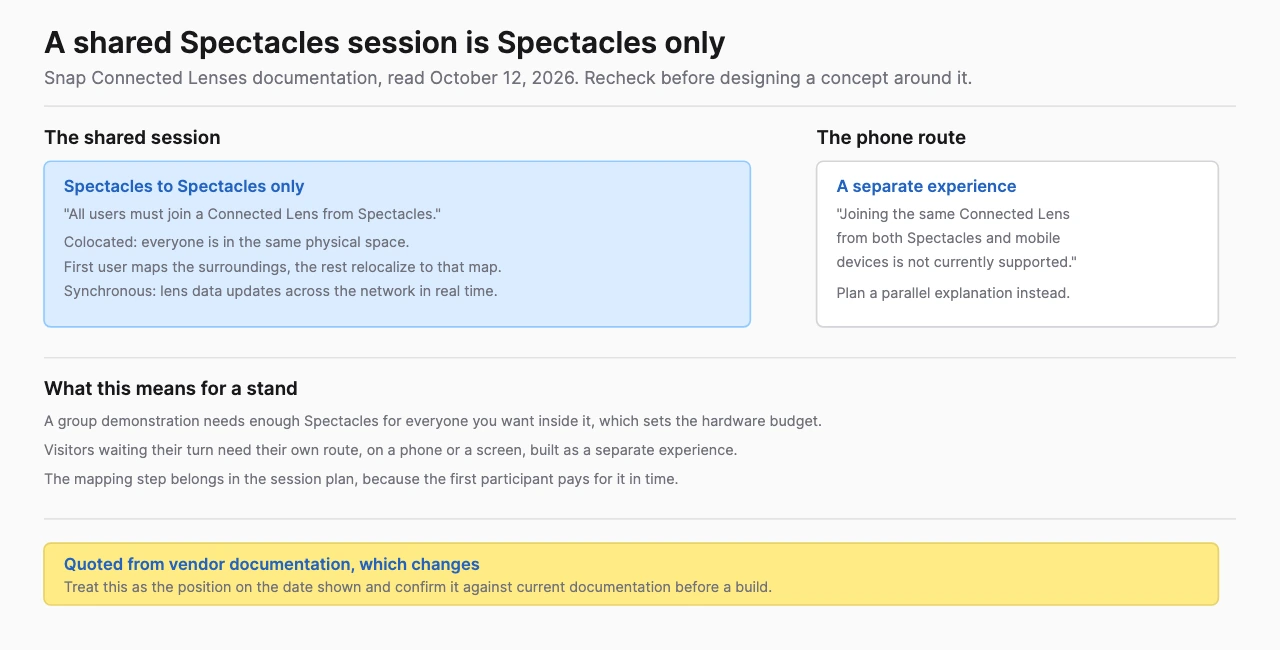
Snap documents colocated Connected Lenses in which users share a map and experience the content synchronously. The first user maps the surroundings and later participants relocalize. The same Connected Lens currently supports Spectacles participants rather than mixed Spectacles/mobile participation. Design the audience routes around that documented boundary.
These statements establish development capabilities. They do not establish that Treeview has already shipped an event application using each route. A proposed concept still needs a feasibility build, hardware access and a supported distribution plan.
Which event concepts are worth prototyping?
Prototype concepts in which the wearable format contributes directly to the task. Start with a narrow action that a staff member can explain and recover, then test whether the glasses improve it relative to a phone or tablet.
Proposed concept: hands-free product guidance. A visitor examines a physical exhibit while receiving approved prompts. Decide whether the prompts require audio, a glanceable display or a spatial overlay. If camera processing is part of the interaction, identify the processing and retention before development.
Proposed concept: guided component inspection. A visitor selects a physical or digital component and receives a label or short explanation. The prototype should test recognition, label placement and readability against the actual exhibit. A small text display and a tracked AR model are different implementation choices.
Proposed concept: colocated product comparison. A host and visitors view the same approved model, selecting options together. Test map initialization, participant entry, synchronization and recovery. A phone participant can receive a separate explanation when same-session mobile participation is unsupported.
Proposed concept: staff-operated briefing. A trained presenter uses glasses for a controlled demonstration while an audience watches the product story on a shared display. Verify the available capture/mirroring route and permissions. A recorded view should not be assumed to match everything the wearer sees.
The activation technology guide helps compare these with simpler delivery routes. Treat them as concepts to validate, not a catalog of shipping event products.
What does a documented glasses activation teach event planners?
A documented activation shows that the surrounding installation matters as much as the application. MAS's Snap Spectacles case identifies AWE 2025, supported demonstrations and an arena designed with unique surfaces for tracking. It illustrates a coordinated device, content and physical-space brief.
Keep the lesson specific. That design choice does not establish a universal tracking rule for all glasses. It does establish the need to rehearse with the actual floor, lighting, surfaces and audience movement.
Historical devices can provide interaction lessons without becoming current procurement recommendations. BestInXR's Magic Leap reference records what became of the device line that carried many early assisted-AR activations. The pattern worth keeping is assisted AR storytelling around a physical object, with a host guiding each visitor through it. The hardware that pattern once ran on is not a procurement recommendation for a new fleet.
Keep the activation date alongside the technology in your own notes, because a glasses capability demonstrated two years ago may sit behind a different distribution route today.
What should a controlled pilot prove?
A pilot should prove the full station cycle on production-intended hardware and software. Begin with a small managed audience, trained staff and an alternative route carrying the same essential information.
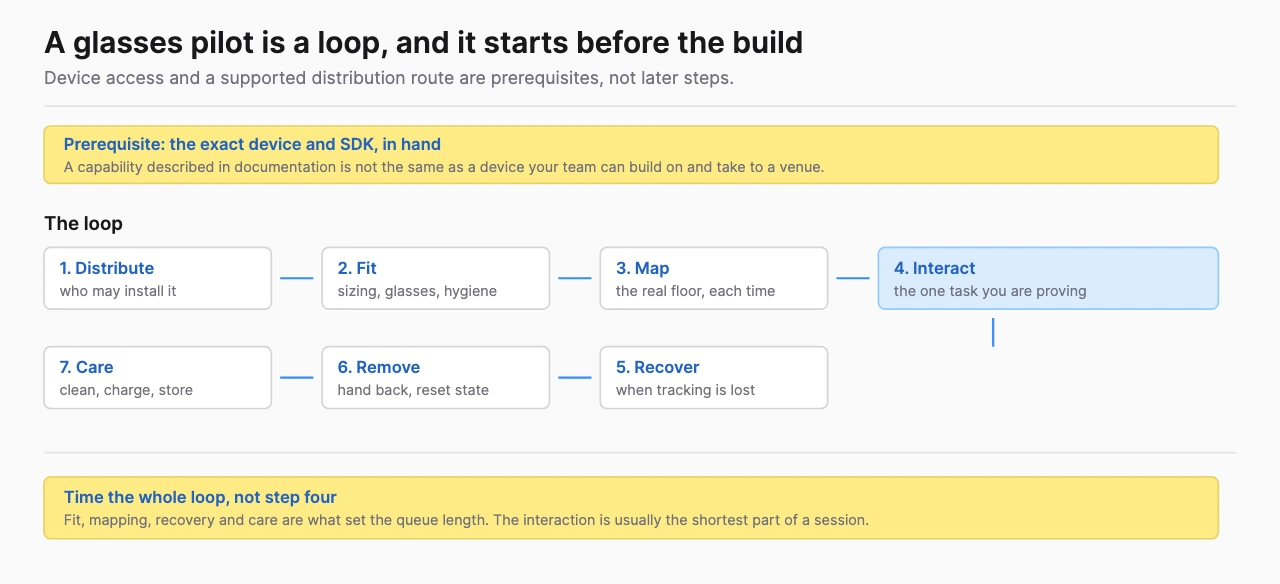
- Confirm device access, supported market and application permissions.
- Test installation, pairing, distribution and first-time entry.
- Rehearse fitting, audio and readable output with intended visitors.
- Initialize tracking in the actual physical area and test recovery.
- Test the required network services and a defined fallback.
- Record battery/charging behavior over the intended operating shift.
- Time removal, approved cleaning and reset.
- Confirm accessibility choices and the host's ability to end a session.
Use observed cycle times to set appointment or queue capacity. Count spare devices as recovery equipment until staffing and space can support them as active stations. A successful developer session answers less than a series of first-time visitor sessions under event conditions.
The whole-event XR guide provides a capacity model and role split. A glasses pilot should use the same operating discipline as a headset or tablet installation.
How should recording, consent and accessibility be planned?
Write the sensor and data workflow before bringing glasses into the audience. State whether cameras and microphones are used, whether media is retained, how notices are displayed and who can access the records. Ask the organization's privacy owner to review the actual event jurisdiction and use case.
Keep participation, recording and marketing permission separate. Give bystanders an appropriate notice and design the station so visitors can understand what the device is doing. Avoid building the value proposition around identifying faces, covert profiling or inferred emotion.
Provide an equivalent product explanation through a phone, tablet or shared display. Readability, fit, prescription needs, hearing and physical interaction should be tested with the intended audience. The W3C XR user-needs work is relevant design input across these access decisions, with no claim that it certifies the activation.
Use device-specific manufacturer care and safety instructions. A general wipe procedure should not be copied across lenses, frames and electronic parts. Incorporate the approved care cycle in the rehearsal and visitor-capacity calculation.
When is another format a better fit?
Another format fits better when it explains the product with less setup or fewer dependencies. Phone AR can work for supported placement and camera tasks. A shared 3D screen can work for a group explanation. Headset VR can work when the simulated environment is the central information.
Choose among them by prototype evidence. If the glasses route requires extensive pairing for a brief glanceable message, test a phone version. If a multiuser experience depends on unsupported combinations, revise the participation model. If a custom spatial model is essential, confirm world tracking before commissioning content.
The AR event guide and VR booth guide develop those alternatives. This is a feasibility decision, not a claim that one device family always wins.
What should a provider receive before quoting?
Send a device/capability brief before asking for a production quote. Include the event market and date, hardware access, visitor task, sensor needs, supported audience routes, staff plan and reuse expectations.
Treeview's smart-glasses development service is a relevant next step for a custom-software discussion. Ask for a feasibility prototype and current SDK/distribution assessment on the named device. Its cross-device Microsoft work supplies adjacent visualization evidence, not proof of a shipping product for your chosen glasses.
Use the event-demo provider shortlist when comparing software and production responsibilities. Require a current support matrix and a plan to recheck dynamic documentation before the event build is frozen.
Frequently Asked Questions (FAQ)
1. Can smart glasses be used for brand activations?
Yes, when the named device supports the required interaction and the event can operate a supported station. Prototype the task, distribution and turnaround before committing to rollout.
2. Do all smart glasses show augmented reality?
No. Some provide camera/audio functions, some show information and some support world-tracked AR. Verify display and tracking capabilities separately.
3. Can visitors join a glasses experience on their phones?
That depends on the platform and application. Snap's Connected Lens documentation currently states that the same Spectacles session cannot combine Spectacles and mobile participants.
4. Can a custom display-glasses app be distributed at an event?
Use the exact platform's supported route. Meta documents developer-mode access for Web Apps while its FAQ describes broader submission/discovery as forthcoming, so a controlled demo and public discovery need separate plans.
5. What should be tested before a smart-glasses event pilot?
Test capability, distribution, fit, tracking, network dependencies, charging, privacy and accessible alternatives. Measure the full first-use cycle with the intended audience.