Virtual reality for events: how to plan VR, AR and spatial demos
VR, AR and spatial experiences can help event visitors inspect a product, understand a process or explore a brand story. Choose the format around that task, then plan the full visitor cycle: invitation, setup, interaction, cleaning and follow-up. A useful event demo also has an accessible alternative and a plan for reuse.
In short:
- Start with a decision: name what a visitor should understand or choose after the demonstration.
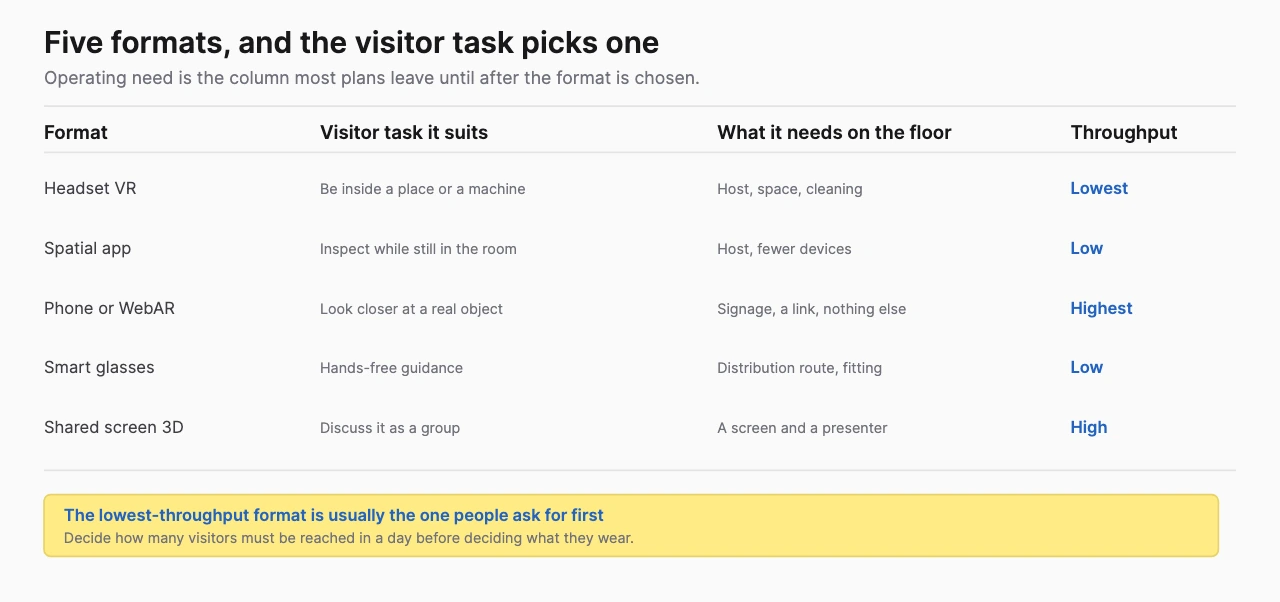
- Choose the delivery format: a headset, phone, screen and pair of smart glasses create different operational requirements.
- Budget for the event cycle: onboarding and turnaround belong in capacity planning alongside the experience itself.
- Build for reuse: decide how sales teams will access the approved content after the event.
What does XR mean at a business event?
XR is an umbrella for virtual, augmented and related spatial experiences. At an event, the practical question is how the visitor sees the content and interacts with it. The W3C's XR accessibility work treats head-mounted, mobile and tracked-display experiences as related formats with different user needs.
Headset VR presents a virtual environment around the wearer. Mobile AR adds digital content to a phone's camera view. WebAR delivers an AR experience through a compatible browser, although browser access still involves loading, device support and permissions. A browser-based 3D viewer that lets a visitor rotate a model is useful, but it becomes AR only when it places that content in a view of the real environment.
Spatial computing describes interaction with digital content arranged in space. A spatial application can present a tabletop product model, use passthrough to retain a view of the venue or open an immersive environment. Treat the application mode and device as separate choices. Calling a demo “spatial” does not tell an event manager how many people can use it or whether it works without a network.
Smart glasses also need a more precise description. Camera/audio glasses can support hands-free media or connected assistance without putting a visual overlay in front of the wearer. Display glasses can show information. World-tracked AR glasses can place content against the surroundings when their hardware and software support it. A visible display alone does not establish that capability. Meta's developer FAQ separates mobile integrations from standalone Web Apps on supported display glasses.
| Format | Useful event task | What the team must plan |
|---|---|---|
| Headset VR | Enter a simulated facility or inspect a product that cannot be brought to the show | Fitting, controls, comfort, operator assistance and turnaround |
| Headset spatial app | Compare a model or process in a controlled demonstration | Tracking, guest setup, input, sightlines and a companion display |
| Mobile/WebAR | Place or explore a product using a visitor's phone | Supported browsers, permissions, download size and a staffed fallback |
| Smart-glasses pilot | Test hands-free guidance or shared AR | Exact device capability, distribution, calibration and recording notice |
| Screen-based 3D | Explain a product to visitors who prefer a shared display | Screen visibility, controls, reachable layout and presenter workflow |
The activation technology comparison turns those differences into a selection process. This guide covers the broader job of getting the experience ready for a live event.
What should the visitor leave understanding?
A useful event brief names one change in understanding before it names a device. Write a sentence such as: “A maintenance buyer can identify the component that reduces service downtime and explain how it is accessed.” That gives the product team something to approve and the event team something to demonstrate.
Choose an interaction that proves the point. Let the visitor remove a housing to expose the component, compare two layouts or trace a flow through the system. A large virtual building contributes little if the product story depends on one valve hidden inside it. Every extra scene should earn its place in the explanation.
Separate product education from entertainment. A branded game can create an invitation to talk, while a configurator can answer a specific purchasing question. Both are legitimate event choices. The measurement and supplier brief should reflect which one you are commissioning.
Three questions help establish that difference. What will visitors do? What will they learn? What happens next if they want more detail? If the last answer is “scan a badge,” write the handoff more precisely. A sales representative needs to know the product and question that interested the visitor.
A service with no physical product is the clearest case for this. Logistics, insurance and energy supply are bought on explanations, and a spatial presentation on a device such as Apple Vision Pro can make a route or a network visible in a way a slide cannot. The transferable idea is the visible explanation, and it does not depend on assuming the headset caused a sale.
Which event demonstrations are worth building?
Build around the information a conventional booth struggles to show. Size, distance, hidden components and time-dependent processes are useful starting points because they create a concrete demonstration problem.
An industrial exhibitor could let a buyer inspect machinery that is too large to ship. An energy business could show flows across a planned site. A medical-device team could demonstrate the approved operation of a mechanism using a model that makes its internals visible. These are proposed concepts, so their claims and visuals still need the relevant product team's approval.
Treeview's Microsoft case describes green-hydrogen project visualization across HoloLens 2, mobile and WebGL, including a showing at a Co-Innovation Lab anniversary. It supports the use of interactive models for stakeholder communication. The checked page does not establish a trade-show lead-generation result or a dated event-capacity measurement.
Brand storytelling has a different brief. Treeview's ULTA Beauty work describes an in-store Meta Quest experience with interactive beauty products. That is relevant creative/software evidence. An event team should still specify its own installation, staffing and venue requirements instead of treating the store project as a documented event deployment.
Use the trade-show VR demo guide for product interaction concepts and the AR event guide for phone-first planning. The verified event-example collection records dated activations separately from adjacent retail or sales work.
How should the experience fit the booth?
Design the booth around a complete visitor route. A demo station needs an invitation, a place to wait, space to use the experience and a clear exit into a conversation. An attractive headset table can still become a bottleneck if those functions compete for the same area.
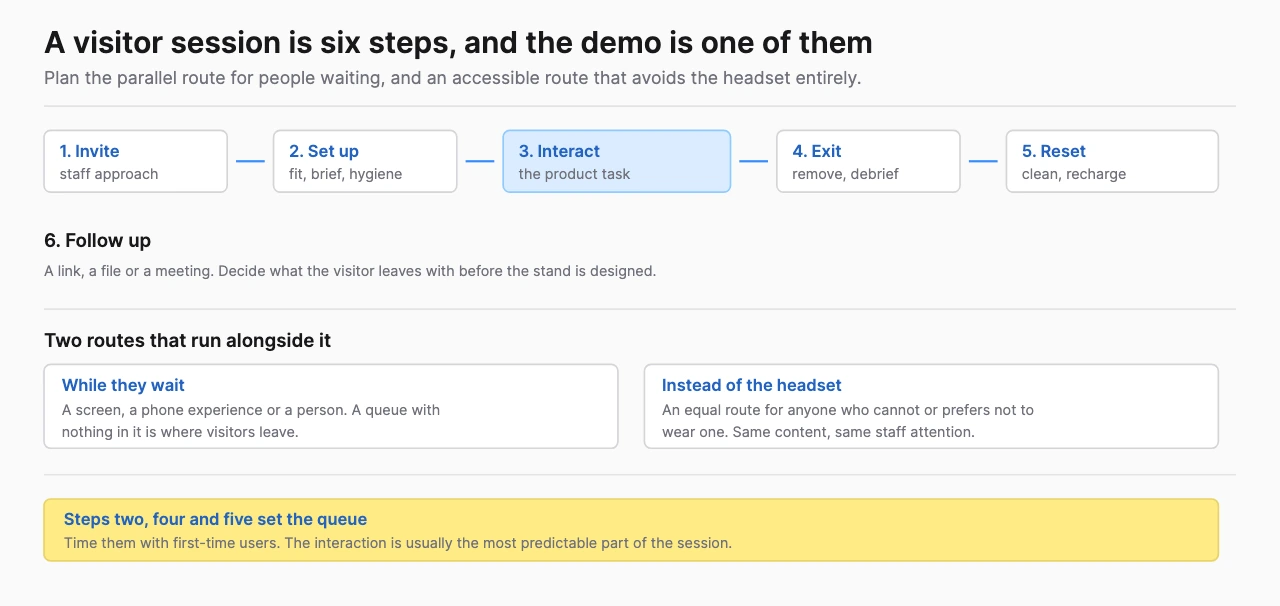
Draw the route on the actual floor plan. Locate power, storage, accessible approach paths and the operator's position. Give the host a way to explain the experience while keeping the entrance clear. Check the organizer's requirements for circulation, structures, sound and equipment before finalizing the installation.
For a headset demo, keep the supervised activity inside a defined area and test how the wearer perceives its boundaries. Choose seated, standing or moving interaction deliberately. Seated operation can support some visitors, but it does not by itself solve access for people with different vision, hearing, reach or control needs.
A companion screen lets an operator follow the session and helps waiting visitors understand what is happening. Decide whether it shows a product view, the wearer's perspective or an approved loop. The display should support the story even when mirroring fails. Apple's Guest User instructions describe guest setup and view mirroring, both of which belong in the operating plan when using Vision Pro.
For phone AR, make the starting instruction readable before the visitor scans. State what the experience does and why camera access is needed. Put the QR code where a person can pause safely. Test the approach with an ordinary phone at the real viewing distance, not only on a designer's large monitor.
How many visitors can the demo serve?
Capacity comes from the whole cycle, not the length of the animation. Time fitting, instructions, interaction, removal, cleaning and reset during rehearsal. Record interruptions as well as successful sessions.
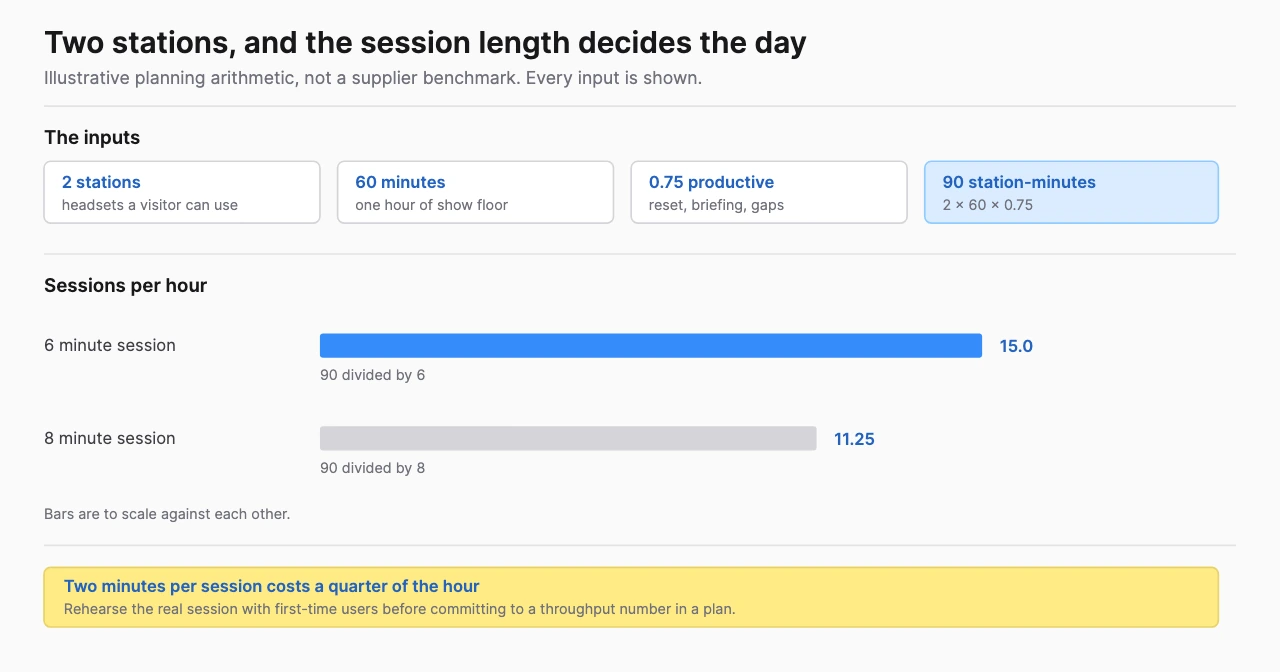
Use a simple planning model:
hourly completions = active stations × 60 ÷ cycle minutes × productive fraction
The productive fraction represents the portion of the scheduled period available for complete cycles after breaks, faults and other interruptions. Define it consistently. A spare device supports recovery; count it as another station only when there is space and staff to operate it.
Illustrative planning assumptions, not measured results: two active stations, a six-minute cycle and a productive fraction of 0.75 give 2 × 60 ÷ 6 × 0.75 = 15 completions per hour. A four-hour window gives 60 completions under those assumptions. If the cycle rises to eight minutes, capacity becomes 11.25 per hour, or 45 over four hours.
That calculation answers one question: how many completed sessions this setup might serve. It does not establish foot traffic, the number of qualified buyers or return on investment. If you expect 80 visitors per hour to approach a station serving 15, add a short screen explanation, scheduled appointments or a different format before expanding the narrative.
| Rehearsal measurement | Why it matters | Planning response |
|---|---|---|
| First-time setup | Regular users understate onboarding effort | Rehearse with people unfamiliar with the device |
| Interaction completion | Open exploration can vary widely | Offer a guided path and a clear endpoint |
| Cleaning/reset time | A finished session is not immediately a ready station | Follow device care guidance and time turnaround |
| Assistance requests | The operator may become the constraint | Simplify controls or change staffing |
| Recovery time | A restart consumes event capacity | Test reset, replacement and fallback routes |
Keep observed capacity by time window so a quiet rehearsal does not become a promise about peak show conditions. The model is useful because its assumptions are visible and replaceable.
Who should operate the experience?
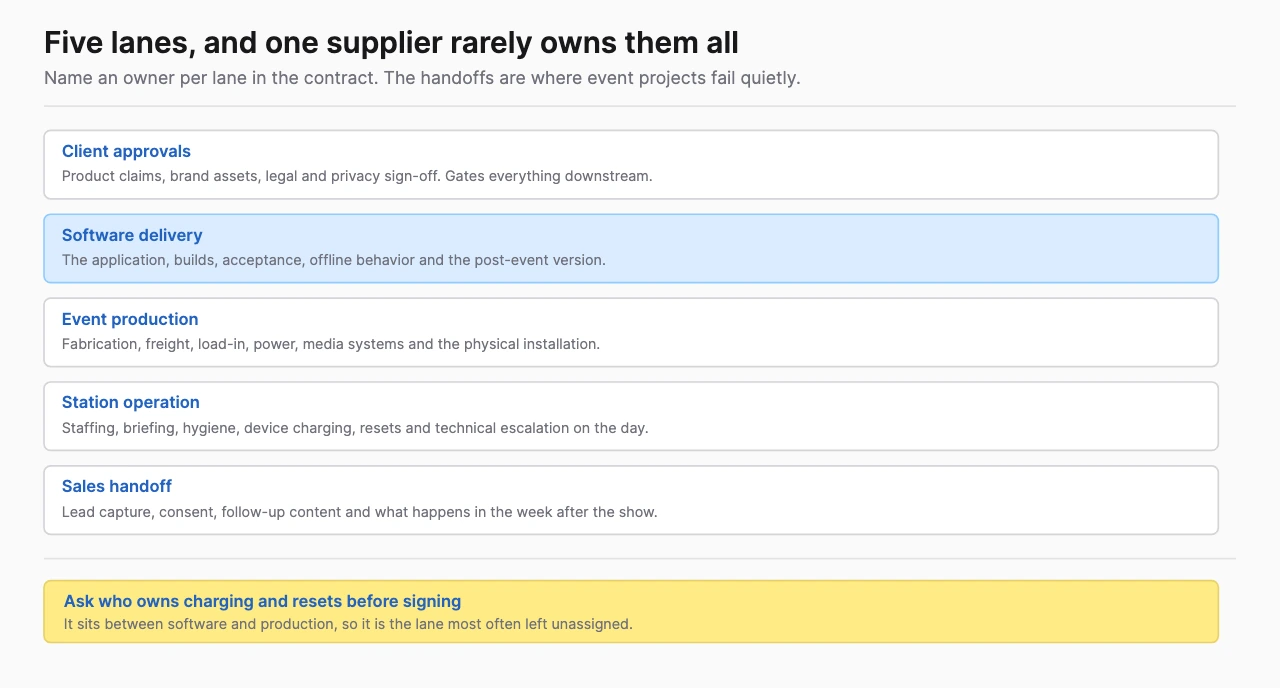
Assign operational roles before deciding the final station count. The host manages invitation and queueing, the operator manages device use and the product representative handles the business conversation. A technical owner handles faults and escalation. One person may cover several roles in a small booth, but the rehearsal must test that workload.
Create a short operator guide covering launch, fit, controls, stop, clean, reset and fault recovery. Include a plain introduction the host can deliver accurately. Staff should be able to help someone leave the experience at any point without making that person feel they failed.
Give each shift a named escalation route and spare-equipment process. Confirm who can change the application, who can swap a device and who decides to switch to the fallback. A contact number that only reaches a developer in another time zone needs a realistic response agreement.
Separate software work from event production. Fabrication, freight, installation, labor, networking and attendee flow may sit with an exhibit builder or production agency. Demodern publishes a combined trade fair and event practice, which is one way to buy both halves from one supplier. The alternative is to keep them separate and name an owner for each. Either way the distinctions are real responsibilities rather than interchangeable job titles, and the contract should say who holds each one.
What should the connectivity plan contain?
Specify which functions need a network and what visitors can still do when it fails. Content, authentication, analytics, multiuser state, CRM capture and media delivery may have different dependencies. “Offline-capable” should refer to a demonstrated build and a defined set of functions.
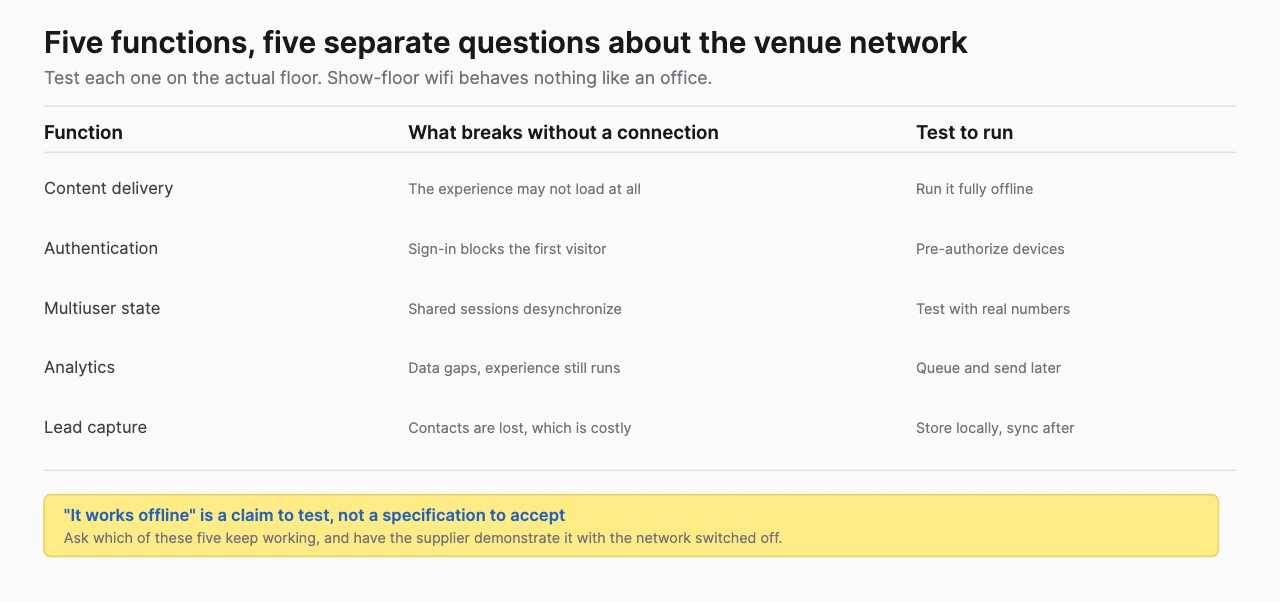
Ask the supplier to perform a cold launch without internet, complete a session and reset it. A demo that works after content has been cached may behave differently after a device restart. Test expiring logins and external services as separate cases.
For connected experiences, ask the venue about permitted routers, interference, dedicated service and support. Rehearse on the intended network configuration where possible. A strong download connection during setup does not establish reliable service once the hall is full.
Use data capture that tolerates interruption. If permitted and designed securely, queue minimal event records locally and synchronize them later. Show staff whether synchronization has succeeded. Avoid collecting personal details in the headset when a simple follow-up form or human conversation can do the job.
The platform choice also affects distribution. Google's model-viewer AR examples document several AR launch modes rather than a single uniform browser route. Test the particular combination of viewer, device and browser you intend to support.
How should hygiene, privacy and accessibility be handled?
Make them design inputs and operating instructions. Device care, informed participation and equivalent access influence which format is suitable, how long sessions take and how staff assist visitors.
Use the manufacturer's instructions for each surface and accessory. Apple's Vision Pro cleaning guidance distinguishes parts and materials, so a generic “wipe everything between users” instruction is inadequate. Confirm acceptable products, turnaround and replaceable contact accessories for the exact device. Let visitors choose a shared-screen alternative.
Write a data map before adding cameras, microphones or registration. State what is processed, what is stored, where it goes and how long it remains. Capture necessary permissions and give bystanders notice where recording may affect them. Have the organization's privacy owner review the actual workflow and event jurisdiction. Technical access to a sensor does not authorize every use of its data.
Design equivalent access around the product explanation. Provide readable labels, captions where needed, alternative input and a presenter-controlled view. Keep essential information available outside the wearable experience. The W3C XR user-needs document is useful design input; it is a Working Group Note, not a certification of your activation.
For a medical or industrial demonstration, approve the boundary between visualization and real product performance. A simulated action should be identified as such. Use approved content and remove confidential geometry or data before an asset reaches a public station.
What should a supplier quote cover?
A comparable quote separates content, software and event operations. Ask suppliers to respond to the same brief and state exclusions. A low software figure is hard to compare with a quote that also includes installation, equipment and on-site support.
Provide the event date and load-in window, audience, visitor task, approved product claims, existing assets, chosen devices, station plan and expected operating hours. Include the fallback, accessibility requirements, connectivity dependencies, data handling and reuse channels. Name the people who approve content and technical changes.
| Workstream | Ask the supplier to specify |
|---|---|
| Content | CAD cleanup, animation, copy, language versions and review rounds |
| Application | Supported devices, operating systems, controls and reset tools |
| Operations | Hardware supply, spares, installation, staff and response coverage |
| Testing | Acceptance scenarios, realistic rehearsal and fault recovery |
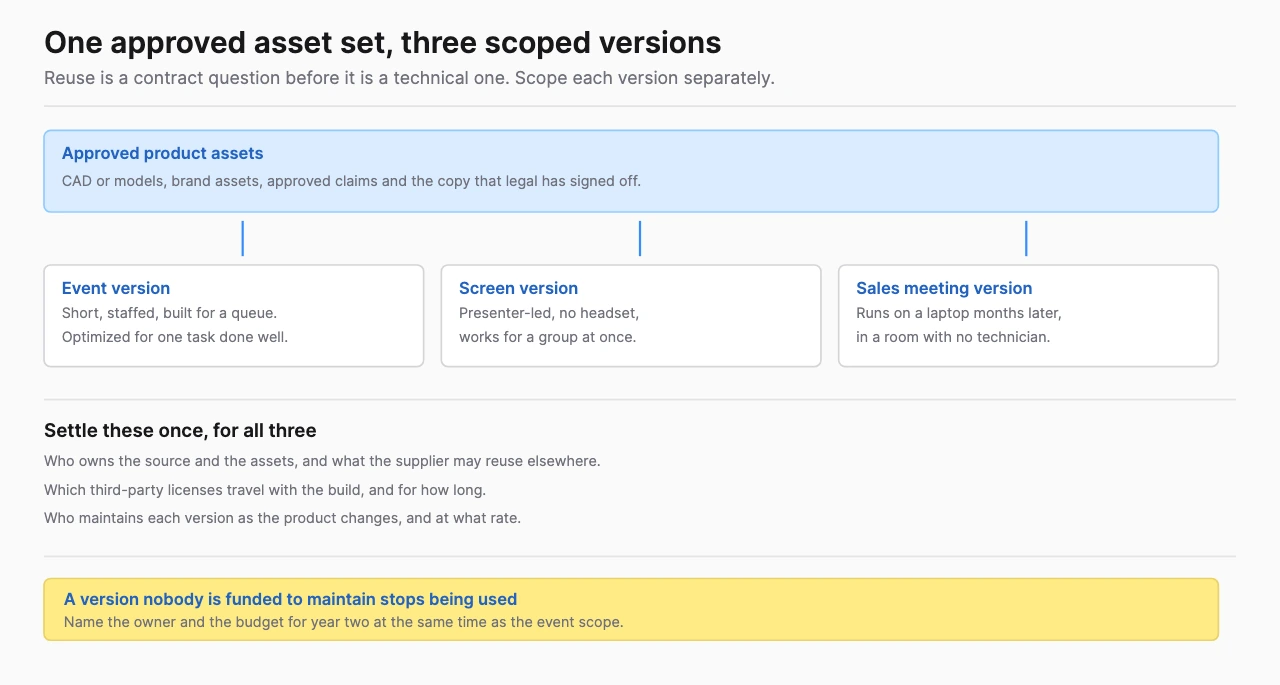
| Rights/reuse | Source code, assets, licenses, export and maintenance responsibilities |
| Commercials | Milestones, change control, cancellation terms and recurring services |
Get a backward plan from the event date, including a build freeze and a rehearsal buffer. The Treeview FAQ describes typical custom projects as 12 to 36 weeks. That is the studio's general planning range, not a quote or a commitment for your activation. A near-term event may call for an existing platform, licensed content or a simpler production brief.
The custom XR event-demo provider shortlist distinguishes reusable custom software from a platform-led sales tool and an installation-led activation. For broader procurement background, BestInXR's XR developer selection guide covers the development relationship beyond one event.
How should the team measure and reuse the demo?
Measure the visitor task and the business handoff separately. Count completed sessions, record the relevant product choices and note qualified follow-up requests. Distinguish anonymous interaction data from identified leads so a completion is not automatically treated as a prospect.
Use a short, consistent understanding question if product education is the objective. Define qualification with the sales team before the event. A useful record might identify the visitor's problem, the product shown and the requested next step. Raw badge scans, headset use and time spent answer different questions.
Attribute results with care. A before/after comparison across different events also changes audience, booth position, staffing and sales activity. Record those conditions. Describe associations plainly unless the design supports a causal conclusion.
Plan reuse while writing the scope. Ask whether the approved model can run on a sales laptop, a browser or a shared display, whether the interface adapts to a meeting and who maintains it. Reuse may require additional work; include those versions in the quote instead of assuming a headset build exports unchanged.
Treeview's custom VR development service is a relevant next step when the project needs commissioned interactive software. Send the event date, product explanation, asset inventory, preferred device and post-show use case. Ask it to define the software responsibilities and any production partner requirements before requesting a delivery commitment.
Where should an event team start?
Start with one visitor task and one testable route through it. Choose the supporting article that answers the team's current decision, then build a brief from the operating requirements above.
- VR trade-show product demonstrations for machinery, internals and guided interactions.
- Augmented reality at events for phone experiences, permissions and assisted access.
- Brand activation technology selection for the device and delivery-model decision.
- Custom XR event-demo providers for a brief-specific supplier comparison.
- Smart-glasses event feasibility for controlled wearable pilots.
Frequently Asked Questions (FAQ)
1. How can virtual reality be used at business events?
VR can present a guided product demonstration, facility simulation or brand story when a virtual environment helps explain the subject. Plan fitting, operation, turnaround and a non-headset alternative as part of the experience.
2. Is AR better than VR for a trade show?
Choose AR when retaining a view of the surroundings or using visitors' phones supports the task. Choose VR when entering a simulated environment adds useful information; verify the capacity and assistance that choice requires.
3. Can an XR event demo work offline?
Some builds can, depending on their content, authentication and service dependencies. Require a cold-launch, complete-session and reset test without internet for the exact event build.
4. How many headsets does an event booth need?
Use rehearsed cycle time, available staff and required completions to calculate active stations. Budget spare devices separately and count them as active capacity only when they can be staffed and operated.
5. Can the same XR content support sales after the event?
Yes, when reuse is included in the scope and delivery terms. Confirm the additional interfaces, device versions, rights and maintenance needed for meetings or online use.
6. Who should build and operate a custom XR event experience?
An XR developer can build the software, while a production agency or exhibit partner may handle the physical installation and attendee flow. Put responsibility for equipment, rehearsal, support and fallback into the agreement.