Augmented reality events: planning AR for product launches and trade shows
AR at events can help visitors place a product, reveal hidden details or follow a branded route while viewing their surroundings. Choose the interaction before choosing a platform. Plan phone compatibility, permissions, loading, physical circulation and assisted access, then measure the visitor's completed task separately from scans, photos and registrations.
In short:
- Use AR for a task: placement, product inspection and exhibit storytelling are different briefs.
- Test the entry route: a QR code still needs a working page, clear permissions and supported devices.
- Provide assisted access: a tablet or shared-screen version can carry the same explanation.
- Keep the data purposeful: camera access, media capture and lead registration need separate decisions.
Which AR event ideas serve a clear purpose?
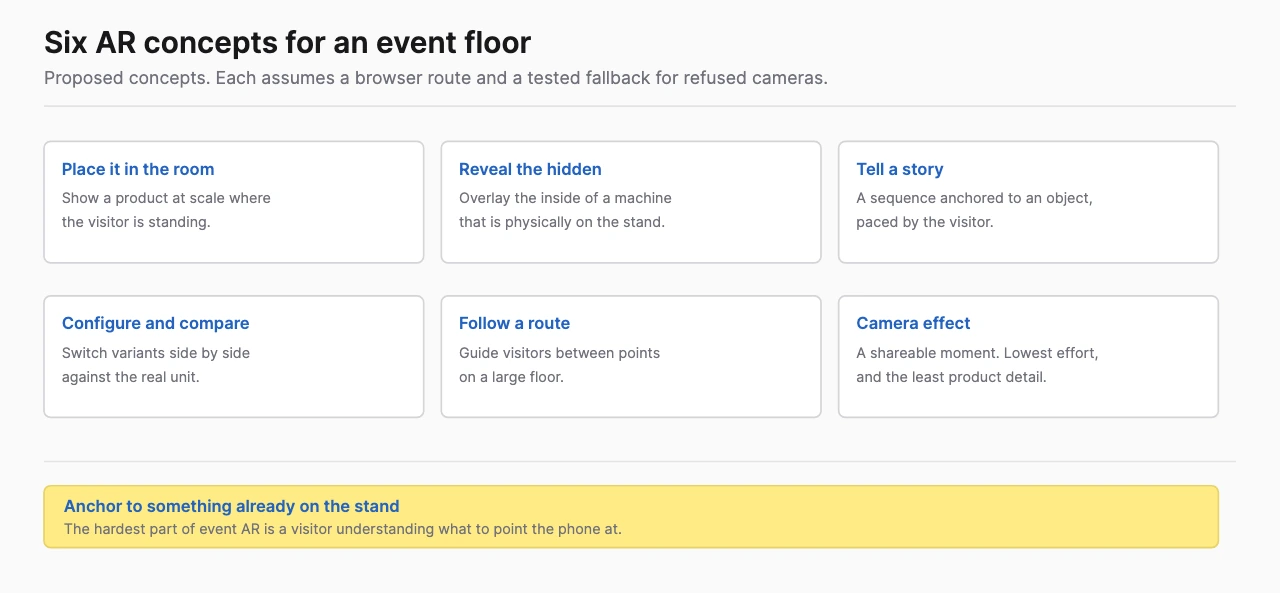
Choose an idea by the action it enables. The following concepts are proposals for event briefs, not a claim that one format always produces better engagement.
| Concept | Visitor task | Asset workload | Operational requirement |
|---|---|---|---|
| Product placement | View an approved model at a useful scale | Model cleanup, materials and scale validation | A suitable surface, tracking and space to pause |
| Hidden-component reveal | Inspect a part behind the casing | Cutaway model and annotations | A stable target or deliberate placement route |
| Guided exhibit story | Activate a short explanation at a stop | Marker artwork, copy and animation | Readable signs, clear sightlines and assistance |
| Configuration comparison | Choose valid options | Variant assets and product rules | Interface clarity and approved configuration logic |
| Scavenger route | Find and complete themed stops | Several targets, progression and rewards | Safe circulation, support and a route outside the busiest aisle |
| Camera effect | Create an optional branded image | Face/body effect and media workflow | Recording choice, consent and delivery instructions |
Product placement is useful when size or fit matters. A component reveal is useful when the advantage is inside the product. A scavenger route is useful when exploring the space serves the story; adding more stops also adds more operational dependencies.
Tying the overlay to a physical object already on the stand is the most dependable pattern here. The visitor points a phone at something in front of them and the overlay explains what the object cannot show on its own, which removes the hardest part of an AR activation: getting someone to understand what to aim at. Run it in the browser and there is nothing to install.
How do mobile AR, WebAR and glasses differ?
Mobile AR uses a phone or tablet to view the camera scene and digital content. WebAR is a browser delivery route on compatible devices; native mobile AR uses an installed app. AR glasses provide a worn display and tracking capabilities defined by the particular device and software.
Choose WebAR when browser distribution and the supported interaction fit the audience. Choose an installed application when its capabilities or managed deployment are required. Choose glasses when hands-free or world-tracked interaction adds enough value to justify fitted, supported stations.
Browser AR is not one uniform runtime. model-viewer documents different AR modes, including platform-specific viewers and WebXR. Ask the developer which route the build uses and which features survive each route. A model that launches successfully on one test phone does not establish the whole support matrix.
For glasses, Snap's Connected Lens documentation describes colocated sessions and shared mapping. Its same-session Spectacles/mobile limitation matters if the proposed experience mixes attendees' phones with glasses. Use the smart-glasses feasibility guide before committing to that design.
What should happen after a visitor scans the code?
The landing page should explain the task, loading state and camera request in plain language. Make the first action obvious and provide a visible way to continue with a 3D or screen explanation if AR cannot launch.
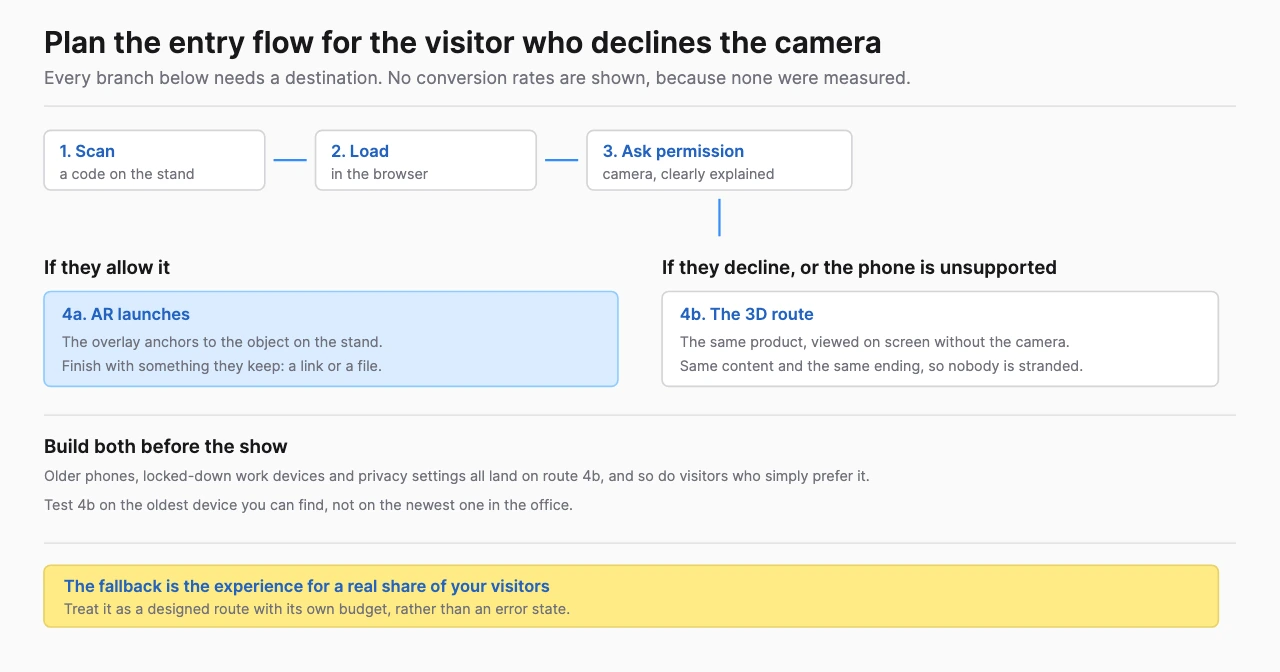
Keep the scan route short. Avoid making a visitor register before learning what the experience does unless registration is necessary for the task. If a reward needs registration, explain the reason and obtain the appropriate approval for the data workflow. A camera permission prompt is not consent to keep a photograph or subscribe someone to marketing.
Use a recognizable domain and readable signage. Put a short URL next to the code for people who prefer another entry method. Test under the venue's actual lighting, at the intended scan distance and on the printed material. A glossy print, poorly placed sign or crowded approach can interrupt the start before the app loads.
For a proposed product-reveal station, the sequence could be: scan, view the product name, choose a 3D view, allow the camera, place the model and select the highlighted component. The product explanation should also work in the 3D view, so camera access is a format choice instead of a condition for learning anything.
How should the team test compatibility and performance?
Test a declared matrix of devices, browsers and entry routes. Include ordinary audience devices, permission refusal, slow loading and a second visit after the page has been backgrounded. Record the observed result for each combination.
Agree an asset budget with the developer and validate it on those devices. Geometry, textures and media affect loading and runtime behavior. Simplify the model around the task instead of treating every engineering detail as equally important. The BestInXR product visualization guide provides the broader asset-work context.
Check placement and tracking in the physical environment. Walls, floor graphics, reflections, changing light and people walking past can affect the intended interaction. A glasses installation may need deliberate tracking surfaces: MAS's AWE 2025 Spectacles case describes unique arena surfaces used for tracking. That example supports site testing, not a universal construction rule for every AR system.
Write a fallback for each material failure. If AR placement cannot initialize, show the rotatable model. If the visitor's phone is unsupported, offer a staffed tablet. If internet access fails, use the approved shared-screen explanation. Test those paths as part of acceptance.
What makes an AR route accessible and workable on the floor?
Keep the essential explanation available through more than one interaction route. AR can require a person to hold a phone, aim a camera, move around an object and read labels against a changing background. Each is a task to test, not an assumed audience ability.
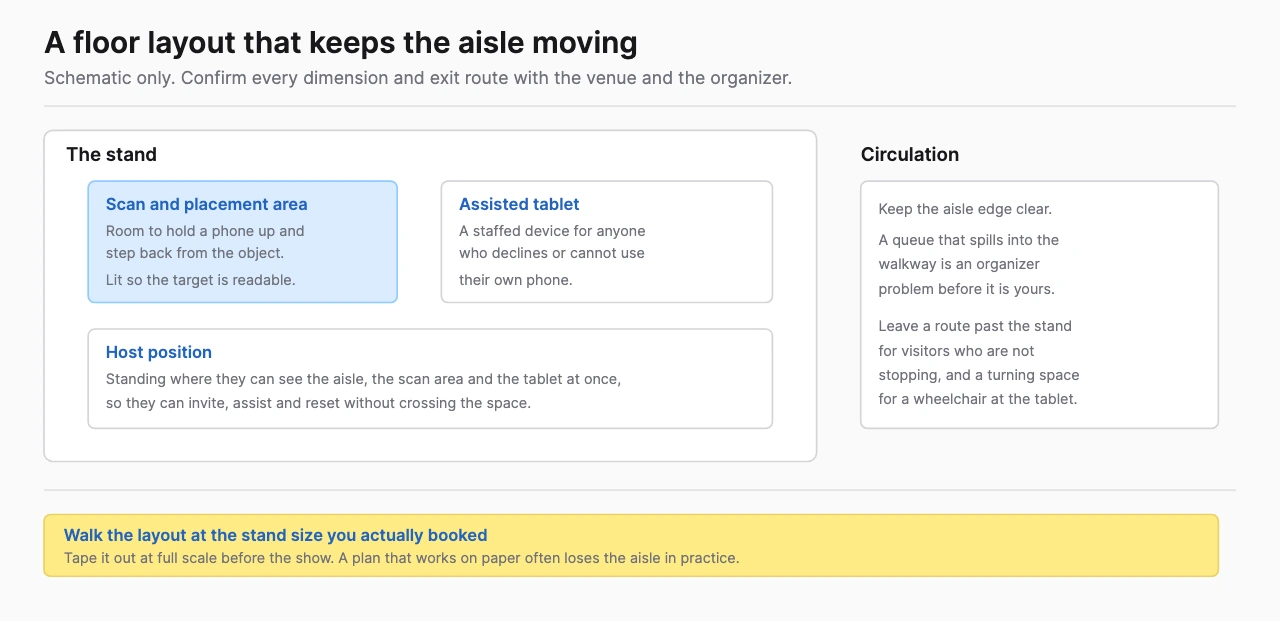
Provide stable text outside the camera view, readable controls and a presenter option. Use captions for essential audio and avoid communicating a state only through color. Ask visitors with relevant access needs to test the proposed route. The W3C XR user-needs document supports thinking about alternative input and output; it is design guidance rather than a certification checklist.
Plan physical circulation as carefully as the interface. Scavenger stops should not pull people into a queue that blocks the main aisle. A placement experience should identify a safe viewing area. Keep the host able to help without reaching for a visitor's personal device as the default.
Shared tablets still require charging, approved cleaning and reset procedures. A phone-first concept can reduce shared equipment, but assisted access remains a staffed service. Include it in the station plan and quote.
What should be measured?
Measure the event task and the follow-up separately. A scan indicates an attempt to start; a successful AR launch indicates entry; completion indicates the visitor finished the defined interaction. Registration and qualified interest are additional events, with different denominators.
For product education, define the question the visitor should be able to answer. For a route, define meaningful completion and record where visitors stop. For an optional image, track successful delivery only if that measurement is approved. Collect the smallest useful dataset and set its retention before launch.
Report supported devices and observable failures alongside completion rates. A high completion rate among visitors who launched successfully can hide a difficult entry route. Keep the scan-to-launch and launch-to-completion stages visible.
The whole-event XR guide covers the sales handoff and operating cycle. Use its framework to keep an AR experience connected to a business objective instead of turning photo counts into assumed pipeline.
Which provider route fits an AR event?
Choose a platform, custom studio or production agency according to the deliverables required. A simple viewer can suit a supported model-and-placement task. Product rules, integrations or a reusable application may call for commissioned software. A large physical installation adds production and site responsibilities.
The event-demo provider shortlist compares those routes. Demodern publishes a trade fair and event practice built on AR, VR, games and AI, which is the closest published match to an AR stand brief. Treeview's Microsoft case supports a discussion of cross-device visualization, without establishing every event-production service.
For a custom product interaction, send Treeview's AR development team the audience, event date, sample model, entry route, supported-device requirements and intended reuse. Ask it to identify the platform dependencies and production responsibilities in the proposal.
Related reading: brand activation technology selection helps set the format before the vendor brief, and VR trade-show demos cover cases where entering a simulated environment adds useful information.
Frequently Asked Questions (FAQ)
1. What are useful augmented reality event ideas?
Product placement, component reveals, guided exhibit stories and carefully designed routes can serve clear visitor tasks. Choose the action around the event objective and test it on the actual floor.
2. Does WebAR need an app download?
WebAR uses a compatible browser route, which can avoid a dedicated app installation. Device support, loading, camera permissions and platform-specific launch behavior still need testing.
3. Can AR work on visitors' own phones?
Yes, when the build supports their device and browser combination. Publish the support requirements and provide assisted access for people who cannot use that route.
4. How should an AR scavenger hunt be planned?
Define the story, stops, completion rule and support route first. Check circulation, connectivity, permissions and accessible alternatives before adding rewards or registration.
5. How can event teams measure AR performance?
Track attempts, successful launches and meaningful completions separately. Record qualified follow-up with its own definition instead of treating every scan as a lead.