
Valve Published the Steam Frame CAD Files and the Full Expansion Port Pinout
Valve released Steam Frame CAD and electrical reference files on October 9, 2026, under a non-commercial Creative Commons license. The package documents the nose bridge port pin by pin: one PCIe Gen4 lane or two four-lane camera interfaces, multiplexed on shared pins, on a rail that stays off until a peripheral grounds pin 44.
In short:
- What Valve published: A public hardware reference repository carrying stripped down CAD for the core module, the head strap and the controllers, seven pages of expansion port documentation and two worked accessory reference designs.
- The license: Creative Commons Attribution-NonCommercial-ShareAlike 4.0, stated in the repository's license file. Valve directs anyone wanting a commercial product to a steamframecompatible address at valvesoftware.com.
- The port: A single PCIe Gen4 lane, or two four-lane MIPI D-PHY v1.2 interfaces at up to 2.5 Gbps per lane, sharing the same physical pins.
- The power budget: 3.1 V at 2 A continuous, which Valve pairs with its own warning that the allowable 6 W "will consume over 25% of the available battery capacity".
- The order windows: Reservation holders can now see whether their purchase email arrives by December or in 2027, and have 72 hours to buy once it lands.
What did Valve actually release?
A repository rather than a document. Valve's October 9 Steam news post says the CAD files are being released that day and points at gitlab.steamos.cloud, where GitLab's own project panel describes it as "Public Steam Frame CAD and Electrical References", created on September 16, 2026, with a single commit.
The repository's README lists seven things in it: documents for interfacing to the expansion port, stripped down CAD of the core module, a full USB 3.0 hub example built in Altium, a minimal USB 3.0 hub example built in KiCad, stripped down CAD of the head strap, an LED locations drawing for the controllers and controller CAD.
That makes this the second Valve document the desk has read in a week that goes further than a spec sheet. The Steam Frame product page already listed the port in a single specification row, which is what our report on the Arcturus color passthrough module was able to cite in September. The repository now publishes the engineering behind that row.
What runs through the expansion port?
Two different buses, on the same pins, chosen by multiplexing. The expansion port document is headed "Project Frame External Interfaces" and the published extract runs from page 8 to page 14 of 14, under the title "Auxiliary Port, Nose Bridge".
The PCIe side is a single Gen4 lane, carrying the TX, RX and reference clock differential pairs. Valve notes that Gen4 is backward compatible to Gen1 and will then run at the slower speed, and that all naming in the pinout is with respect to the core, so a designer must not connect the core TX to a peripheral TX.
The camera side is two separate four-lane MIPI D-PHY v1.2 interfaces with a maximum of 2.5 Gbps per lane. Valve asks for 85 ohm differential routing, intrapair length matching within 150 micrometers and interpair matching within 350 micrometers.
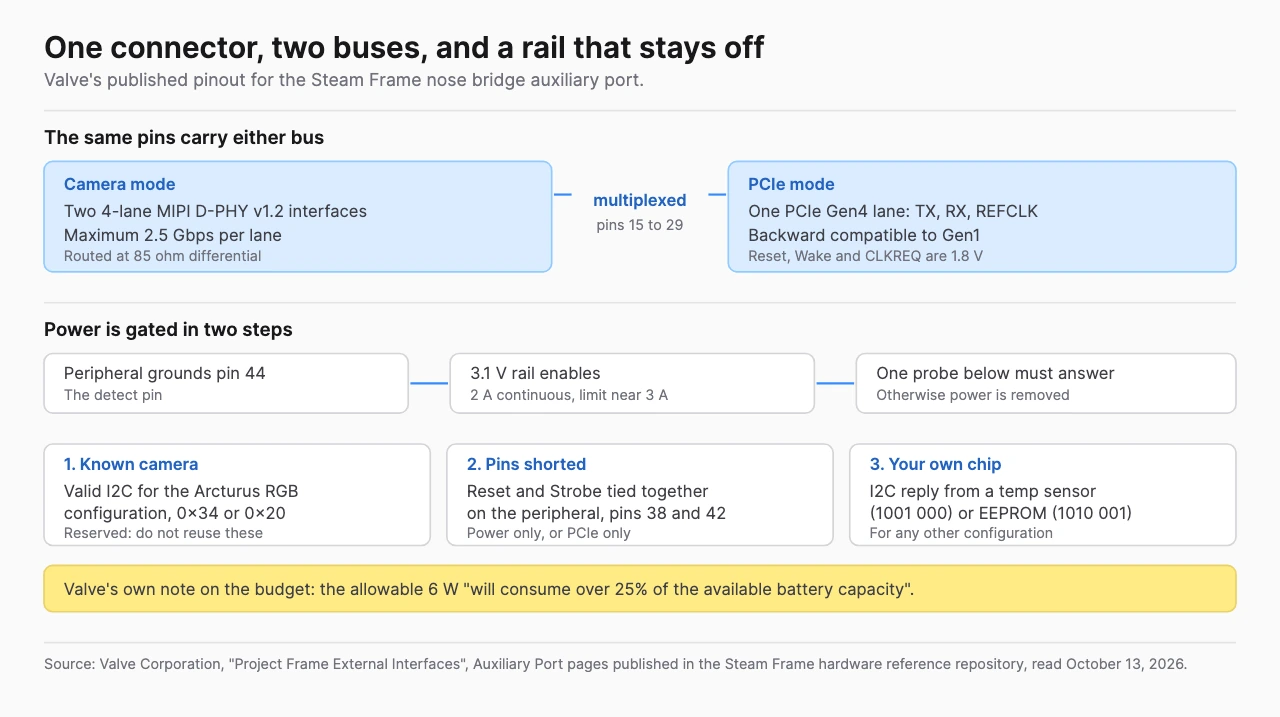
The multiplexing is visible in the pin table itself. Pin 15 is named L_CLK_PCIE_RX_P and is described as both the left camera D-PHY clock lane positive and the PCIe receive pair positive. Pin 24 carries the left camera master clock and the PCIe CLKREQ signal. Pin 26 is the camera trigger and the PCIe wake signal. A peripheral uses one personality or the other, not both.
How does the port decide to turn on?
In two steps, and the second one is the interesting half. Power is not applied at all until the detect pin, pin 44, is connected to ground by the peripheral. Once it is, Valve's firmware looks for one of three things before it will keep the 3.1 V rail alive.
The first is a valid I2C response for a known camera configuration, which Valve's document names as the Arcturus RGB module and gives as addresses 0x34 and 0x20. The second is the reset and strobe pins, 38 and 42, shorted together on the peripheral, which Valve describes as the route for a device that is power only or PCIe only and needs no driver work. The third is an I2C reply from either a temperature sensor at address 1001 000 or an EEPROM at 1010 001.
If none of the three answers, Valve's document says power is removed from the port.
That first condition is worth pausing on, because it is Valve confirming from its own side something this site could previously source only from the accessory maker. Our Arcturus report cited that company's claim that passthrough support "ships with Steam Frame and works immediately on plug-in". Valve's pinout now shows why: the headset probes for that specific camera configuration by address, and tells every other designer those addresses are reserved.
What does Valve tell accessory makers to build?
Two complete reference designs and a short list of parts. The full example is in three pieces: a breakout that takes the port to a board-to-board mezzanine connector, a flex to carry the signals to wherever the main board sits and a PCIe to USB adapter built on a UPD720202K8-711 controller with an EEPROM that Valve calls critical for identifying non-standard devices.
The minimal example ships as KiCad source, and Valve says plainly that it does not recommend it for a real accessory because of the rigid connection to the port. It is published as a reference for what the interface needs rather than as a design to copy.
The fabrication requirements are specific enough to order a board against. Pads are 0.5 mm pitch and 0.35 mm wide, the board is 0.8 mm thick from pad to pad, the inserting corners are cut at 45 degrees and the edge is chamfered at 20 degrees to a depth of 0.3 mm. Valve asks for ENIG or hard gold pads, 0.2 mm holes and 0.1 mm outside precision.
A few electrical details carry the same level of detail. All digital IO is 1.8 V, and the PCIe reset, wake and CLKREQ signals are 1.8 V and not 3.3 V tolerant, with any translation left to the peripheral. The I2C pull-up resistors, 2.2 kilohm to 1.8 V, have to go on the peripheral rather than the core, which Valve says is deliberate, because peripheral power-up sequencing varies and it wants to avoid back-driving. For a PCIe device other than the camera module, Valve recommends an NXP P3T1084 temperature sensor on the I2C bus. The datasheet link printed in Valve's own document no longer resolves, so the part number is the thing to search on.
When do reservation holders get a purchase email?
By December, or in 2027. The same Steam news post tells anyone holding a reservation to open the Steam Frame product page while signed in, where Valve now shows which of those two windows applies. Anyone in the 2027 group is told they will get more detailed timing by January.
Valve also sets a deadline at the other end. Once a purchase email arrives, the buyer has 72 hours to complete the order or Valve moves to the next person in the queue.
The mechanics behind the queue are the ones our Steam Frame launch report recorded in September, and Valve has now restated the dates: signups opened on September 14, a one-time randomization ran on September 17 and order fulfillment began on September 18. Queues are run separately by region, so some regions will reach their waitlist sooner than others, and Valve says nobody on a waitlist moves ahead of anyone holding a reservation.
What else has shipped since launch?
A list of software changes, in the same post. The headline figure is power: Valve reports improvements to efficiency and battery lifetime during both streaming and local gameplay "with gains of up to 12%", noting that results vary with framerate and content.
Two of the changes are accessibility settings. Users can now specify a dominant eye, which controls which eye feeds spectator view and screenshots, and there is a new option to limit eye tracking to a single eye. A new presence sensor sensitivity control has a high sensitivity mode that keeps the displays on in a wider range of conditions, which Valve gives glasses spacers as the example of.
The rest is maintenance, including fixes for a streaming error Valve calls "Error 17", wireless adapter connectivity problems in some countries and controller bindings failing to load in certain titles including Google Earth VR and Thumper. This is the second update post on the headset's own news feed, after the SteamOS 0.3.0 release in September.
What this adds to the Steam Frame Compatible program
A design surface and a commercial route, where before there was a mark and a caption. Valve's license file releases the materials for non-commercial use, invites anyone interested in a commercial product to get in touch, and the README gives a steamframecompatible address at valvesoftware.com to write to.
The same documents set out the consequences. Valve states that opening the enclosure voids the hardware warranty, as does attaching hardware that is not Steam Frame Compatible to any electrical interface port, and the README repeats that Valve is not responsible for damage arising from interfaces that do not carry the mark. Valve also reserves the right to change the hardware design in any way and provides everything on an as-is basis.
For a reader comparing headsets, the useful comparison is what a manufacturer puts in public. Our XR spec gap report tracks how much of this category's hardware detail never gets published at all. A pinout, a power budget, two reference designs and the fabrication tolerances for a mating board put Steam Frame at the opposite end of that range, and the XR headset comparison puts the rest of Valve's published specification beside Meta, Apple, Samsung and Pico.
Frequently Asked Questions (FAQ)
1. Did Valve release the Steam Frame CAD files?
Yes. Valve announced the release in a Steam news post dated October 9, 2026 and published the files in a public repository containing stripped down CAD for the core module, the head strap and the controllers, expansion port documentation and two reference designs.
2. What interface does the Steam Frame expansion port use?
Both PCI Express and MIPI, multiplexed on the same pins. Valve's published pinout gives a single PCIe Gen4 lane with TX, RX and reference clock pairs, or two four-lane MIPI D-PHY v1.2 camera interfaces running at up to 2.5 Gbps per lane. A peripheral uses one or the other.
3. How much power can a Steam Frame accessory draw?
Valve's document rates the 3.1 V supply at up to 2 A continuous with a current limit near 3 A, and notes an early 1 A part was changed to the 2 A part at ramp. It also warns that the allowable 6 W "will consume over 25% of the available battery capacity", so minimizing consumption is recommended.
4. Can I sell an accessory I design from Valve's files?
Not under the published license. The materials are released under Creative Commons Attribution-NonCommercial-ShareAlike 4.0, which covers non-commercial use with attribution and no implied endorsement. Valve's README and license both invite anyone pursuing a commercial product to contact a steamframecompatible address at valvesoftware.com.
5. When will my Steam Frame reservation turn into an order?
Valve now shows the window on the Steam Frame product page when you are signed in, as either by December or in 2027, with more detailed timing promised to the 2027 group by January. Once the purchase email arrives there are 72 hours to complete the order.